

AP-202 Dumps PDF 2026 Program Your Preparation EXAM SUCCESS
Get Perfect Results with Premium AP-202 Dumps Updated 225 Questions
NEW QUESTION # 47
What is the fastest route to establishing the data needed for checkout development when setting up a new Store?
- A. Import the data with data loader
- B. Select Add Sample Data when setting up the store
- C. Use sfdx setup scripts
- D. Import a previously exported store archive
Answer: C
Explanation:
Option B is the correct answer because it describes the fastest route to establishing the data needed for checkout development when setting up a new store. The developer can use sfdx setup scripts to deploy a Lightning B2B testing environment that includes checkout flows, sample products, and a buyer. This way, the developer can quickly and easily test and customize the checkout flow using Experience Builder or Flow Builder. The other options are incorrect because they either require more time, manual steps, or additional tools to set up the data for checkout development. For example, importing a previously exported store archive or using data loader would require the developer to have access to the source data and the target org, and to map the fields and objects correctly. Selecting Add Sample Data when setting up the store would only provide a limited amount of data that may not be sufficient for checkout development.Create a B2B Commerce Org and Checkout Flow,B2B Commerce on Lightning Experience Developer Guide,B2B Commerce and D2C Commerce Developer Guide
NEW QUESTION # 48
Which tool is used to retrieve and manipulate Salesforce data in a Lightning Web Component?
- A. Proxy adapters
- B. Aura requests
- C. XHR requests
- D. Wire adapters
Answer: D
Explanation:
In Lightning Web Components, wire adapters are used to retrieve and manipulate Salesforce data. Wire adapters abstract the underlying data access mechanism, providing a declarative way to access Salesforce data and metadata. Salesforce documentation on LWC and the @wire decorator details how wire adapters can be used to connect components to Salesforce data sources, including standard and custom objects, facilitating reactive data binding and efficient data retrieval.
NEW QUESTION # 49
Which cart item type is created with the Cart Delivery Group Method after the shipping integration?
- A. Delivery
- B. Surcharge
- C. Shipping
- D. Charge
Answer: D
Explanation:
A cart item with a type of Charge is created with the Cart Delivery Group Method after the shipping integration. A shipping integration is an integration that calculates and applies shipping costs and options to a cart or an order based on various factors, such as product weight, dimensions, quantity, location, and carrier service level. A shipping integration can use either an external shipping service provider or custom Apex code to perform the shipping calculation. The Cart Delivery Group Method is a method that determines how products are grouped into delivery groups based on their shipping methods and addresses. A delivery group is a logical grouping of products that are shipped together using the same shipping method and address. After performing the shipping calculation for each delivery group, the shipping integration creates a cart item with a type of Charge and a charge type of Shipping for each delivery group. These cart items represent the shipping costs and options that are applied to each delivery group. A cart item with a type of Surcharge, Shipping, or Delivery does not exist or is not related to the shipping integration. Salesforce [B2B Commerce Developer Guide: Shipping Integration], [B2B Commerce Developer Guide: Cart Delivery Group Method]
NEW QUESTION # 50
How do the REST APIs in Salesforce B2B Commerce support pass-through parameter handling
- A. Parameters are filtered out before the request is processed
- B. Parameters are passed through the service handlers
- C. An exception is generated for unknown API keys
- D. Parameters are separated, but unused
Answer: B
Explanation:
The REST APIs in Salesforce B2B Commerce support pass-through parameter handling by passing parameters through the service handlers. This means that any parameters that are not recognized by the REST API framework will be passed to the service handler class that implements the API logic. The service handler class can then use these parameters for custom logic or validation.
NEW QUESTION # 51
A developer needs to implement specific styling for a standard component on a single page of the B2B Commerce store using an Aura template. The component should use the default style on all other pages How should the developer implement the required changes over multiple instances?
- A. Create a Custom Theme Layout Aura component that imports the custom CSS file. Set up the page to use this Theme Layout.
- B. Use the Override CSR Editor in the Experience Builder and add the desired CSS to change the styles.
- C. Create a Custom Content Layout Lightning web component that imports the custom CSS file. Set up the page to use this Content Layout.
- D. Use a Custom CSS file in a static resource and add the import using the Edit Head Markup Editor in the Experience Builder.
Answer: A
Explanation:
To implement specific styling for a standard component on a single page of the B2B Commerce store using an Aura template, a developer should create a custom theme layout Aura component that imports the custom CSS file and set up the page to use this theme layout. A theme layout is a type of Aura component that defines the header and footer of a page in the storefront. A theme layout can also import custom CSS files from static resources and apply them to the page. A developer can create a custom theme layout Aura component that imports the custom CSS file that contains the specific styling for the standard component and assign it to the page that needs the custom styling. This way, the custom styling will only affect the standard component on that page and not on other pages that use a different theme layout. Using a custom CSS file in a static resource and adding the import using the Edit Head Markup Editor in the Experience Builder is not a valid way to implement specific styling for a standard component on a single page, as it will affect all pages that use the same template. Creating a custom content layout Lightning web component that imports the custom CSS file and setting up the page to use this content layout is not a valid way either, as it will not affect the standard component that is outside of the content layout. Using the Override CSR Editor in the Experience Builder and adding the desired CSS to change the styles is not a valid way either, as it will affect all pages that use the same template. Salesforce B2B Commerce Developer Guide: Theme Layout Component,B2B Commerce Developer Guide: Content Layout Component,B2B Commerce Developer Guide: Override CSR Editor
NEW QUESTION # 52
Which two Salesforce B2B Commerce visualforce pages must be enabled at a Salesforce Community level to make the out of the box SEO functionality available? (2 answers)
- A. CCSizeIndex
- B. CCCatSiteMap
- C. ProductMap
- D. SizeMap
Answer: A,B
Explanation:
Two Salesforce B2B Commerce Visualforce pages that must be enabled at a Salesforce Community level to make the out of the box SEO functionality available are:
CCSizeIndex: This page generates a sitemap.xml file, which is a file that lists all the pages and resources on a site that can be crawled by web crawlers. The page uses the configuration settings CO.SiteMapIncludeProducts and CO.SiteMapIncludeCategories to specify which products and categories should be included in the sitemap.
CCCatSiteMap: This page generates a category sitemap file, which is a file that lists all the categories on a site that can be crawled by web crawlers. The page uses the configuration setting CO.SiteMapCategoryDepth to specify how many levels of subcategories should be included in the category sitemap. Salesforce B2B Commerce and D2C Commerce Developer Guide,Sitemap Files
NEW QUESTION # 53
Which three statements are accurate?
- A. A Lightning Web Component can contain an Aura component
- B. An Aura component can contain another Aura component
- C. A Lightning Web Component cannot contain an Aura component
- D. An Aura component can contain a Lightning Web Component
Answer: B,C,D
Explanation:
Salesforce documentation clarifies the interoperability between Aura and Lightning Web Components (LWCs). An Aura component can indeed contain another Aura component, as well as a LWC, allowing for a mix of component technologies in a single application. However, due to the architectural and design principles of LWCs, a LWC cannot contain an Aura component. This is because LWCs are designed to be lightweight and leverage web standards, which makes them not fully compatible with the older Aura component framework in terms of containment.
NEW QUESTION # 54
Why is the use of a standard Visualforce control such as apex:form discouraged in Salesforce B2B Commerce page includes and subscriber pages?
- A. Javascript events are not supported within an apex:form control
- B. Apex:form render DOM components slowly
- C. The CCRZ Javascript object is not accessible within an apex:form control.
- D. Visualforce "scopes" controls that are present on a page and scope of the control will be set to "ccrz"
Answer: C
Explanation:
The use of a standard Visualforce control such as apex:form is discouraged in Salesforce B2B Commerce page includes and subscriber pages because the CCRZ JavaScript object is not accessible within an apex:form control. The CCRZ JavaScript object is a global object that provides access to various B2B Commerce functions and properties, such as logging, utilities, events, and configuration. Using an apex:form control would prevent the developer from using the CCRZ JavaScript object and its features. Visualforce does not "scope" controls that are present on a page and scope of the control will be set to "ccrz", as this is not a valid statement. Apex:form does not render DOM components slowly, as this is not a performance issue. JavaScript events are supported within an apex:form control, as this is not a limitation. Salesforce B2B Commerce Developer Guide: CCRZ JavaScript Object, B2B Commerce Developer Guide: Page Includes
NEW QUESTION # 55
In which three ways should useful debugging information in Salesforce B2B Commerce implementation be garnered? (3 answers) A) Enabling the logging token via
- A. Logging into the community as a system administrator to identify any potential permissions or Visualforce exceptions.
- B. Placing a System.debug() statement anywhere in the class being debugged.
- C. Admin andsubsequently inspecting the logs via the browser console.
- D. Enabling debugging options for the current user and visually inspecting the Salesforce debug logs.
- E. Logging a case with Salesforce support to enable advanced debugging options.
Answer: A,C,D
Explanation:
Useful debugging information in Salesforce B2B Commerce implementation can be garnered in three ways:
Enabling the logging token via Admin and subsequently inspecting the logs via the browser console. This will enable logging messages and errors to the browser console, which can be viewed by opening the Developer Tools in the browser. The logging token can be enabled by setting the value of CO.logToken to true in CCAdmin.
Enabling debugging options for the current user and visually inspecting the Salesforce debug logs. This will enable logging messages and errors to the Salesforce debug logs, which can be viewed by opening the Debug Logs page in Salesforce Setup. The debugging options can be enabled by creating a Debug Level and a Trace Flag for the current user in Salesforce Setup.
Logging into the community as a system administrator to identify any potential permissions or Visualforce exceptions. This will allow viewing any errors or warnings that may occur on the community pages due to insufficient permissions or Visualforce issues. The system administrator can also access CCAdmin and other tools from within the community. Salesforce B2B Commerce and D2C Commerce Developer Guide,Logging, Debug Your Code
NEW QUESTION # 56
Which wire adapter should a developer use to retrieve metadata about a specific object?
- A. getObjectlnfo
- B. getObjectMetadata
- C. getObjectDescribe
- D. getObject
Answer: A
Explanation:
To retrieve metadata about a specific object, a developer should use the getObjectInfo wire adapter. The getObjectInfo wire adapter imports data from the @salesforce/schema module and returns an object that contains information such as the object's label, key prefix, fields, child relationships, record type infos, and theme. The getObjectMetadata wire adapter does not exist. The getObject wire adapter does not retrieve metadata, but rather returns a record object based on the record ID. The getObjectDescribe wire adapter does not exist either. Salesforce [Lightning Web Components Developer Guide: getObjectInfo], [Lightning Web Components Developer Guide: Import Salesforce Schema]
NEW QUESTION # 57
Which three steps are necessary to have subscriberpage added to Salesforce B2B Commerce after creating a custom Visualforce page? (3 answers)
- A. Enable the Subscriber Page in CC Admin.
- B. Create a new Visualforce page, and manually import the Salesforce B2BCommerce JavaScript libraries. Run in Anonymous Apex ccrz.cc_util_Reflection.upsertPageUIKey([arg1],[arg2],[arg3]);
- C. Create a new CC Subscriber Page record that points to your custom Visualforce page.
- D. Refresh the Page Keys Index in CC Admin.
Answer: A,C,D
Explanation:
Three steps that are necessary to have a subscriber page added to Salesforce B2B Commerce after creating a custom Visualforce page are:
Create a new CC Subscriber Page record that points to your custom Visualforce page. This record will store information about the subscriber page, such as the name, description, URL, and Visualforce page. For example, you can create a new record named MySubscriberPage that points to your custom Visualforce page named MyPage.
Refresh the Page Keys Index in CC Admin. This action will update the page keys index, which is a cache that stores the mapping between the page keys and the subscriber pages. You need to do this whenever you create or modify a subscriber page record.
Enable the Subscriber Page in CC Admin. This action will allow you to select the subscriber page from the CC Page Settings configuration and assign it to a CC Page. For example, you can enable MySubscriberPage and assign it to the Home page. Salesforce B2B Commerce and D2C Commerce Developer Guide,Subscriber Pages
NEW QUESTION # 58
How can the display of CC Menu Items be customized for different users?
- A. cc_hk_Category extension to pre-process which category items are cached as menu items
- B. cc_hk_Category extension to post-process any cached menu items
- C. cc_hk_Menu extension to post-process any cached menu items
- D. cc_hk_Menu extension to pre-process which menu items are cached
Answer: C
Explanation:
The display of CC Menu Items can be customized for different users by using the cc_hk_Menu extension to post-process any cached menu items. This extension allows modifying the menu items based on the user context, such as the user role, account, or cart. For example, the extension can hide or show certain menu items based on the user's permissions or preferences.
NEW QUESTION # 59
A developer has made a component with a lightning combobox in the follow! markup. To handle changes on the combobox, what should replace <CHANGE FVENT>?
- A. {event:handleChange}
- B. {handleChange()}
- C. {handleChange}
- D. javascript:void(0);handleChange();
Answer: C
Explanation:
To handle changes on the combobox, the developer should replace <CHANGE EVENT> with {handleChange}. The handleChange is a function that is defined in the JavaScript file of the Lightning web component and is invoked when the value of the combobox changes. The developer can use this function to perform custom logic or actions based on the selected value of the combobox, such as updating other components or properties, calling Apex methods or services, or firing events. The developer can use the onchange attribute to bind the handleChange function to the combobox element in the HTML file of the Lightning web component. The onchange attribute is an HTML attribute that specifies a function to be executed when the value of an element changes. {event:handleChange} is not a valid way to handle changes on the combobox, as it is not a valid syntax for binding a function to an element. javascript:void(0);handleChange(); is not a valid way either, as it is not a valid syntax for binding a function to an element. {handleChange()} is not a valid way either, as it is not a valid syntax for binding a function to an element. Salesforce Lightning Web Components Developer Guide: Handle Events, Lightning Web Components Developer Guide: Communicate with Properties, Lightning Web Components Developer Guide: lightning-combobox
NEW QUESTION # 60
A developer is building a custom component in Lightning web components (LWC) that needs to fetch data from an API.
Which lifecycle hook should the developer use to make the API call?
- A. renderedCallback
- B. errorCallback
- C. connectedCallback
- D. disconnectedCallback
Answer: C
Explanation:
To make an API call in a Lightning web component (LWC), a developer should use the connectedCallback lifecycle hook. The connectedCallback lifecycle hook is invoked when the component is inserted into the DOM. This is the ideal time to make an API call, as the component is ready to receive and display data. The developer can use the fetch API or a third-party library, such as axios, to make the API call and handle the response. The renderedCallback lifecycle hook is not a good choice for making an API call, as it is invoked every time the component is rendered or rerendered. This can cause unnecessary or repeated API calls and affect performance. The errorCallback lifecycle hook is not a good choice either, as it is invoked when an error occurs in the component or in one of its children. This is not related to making an API call, but rather to handling errors. The disconnectedCallback lifecycle hook is not a good choice either, as it is invoked when the component is removed from the DOM. This is not a suitable time to make an API call, as the component is no longer visible or active. Salesforce Lightning Web Components Developer Guide: Lifecycle Hooks,Lightning Web Components Developer Guide: Call an Apex Method Imperatively
NEW QUESTION # 61
Which two aspects are applicable to Page Includes? (2 answers)
- A. Page Includes must be assigned to an OOTB Page, i.e. Home, Product Detail, etc., and enabled
- B. If a controller is used for an included page, then a merge variable must be present on the page.
- C. Page Includes can be configured as Body Includes Begin.
- D. Standard Visualforce controls such as apex:form should not be used within a page include
Answer: C,D
Explanation:
Two aspects that are applicable to Page Includes are:
Standard Visualforce controls such as apex:form should not be used within a page include. This is because the page include is rendered inside an existing Visualforce page that already has a form element. Using another form element inside the page include will cause conflicts and errors. Instead, the page include should use HTML elements or custom components that do not require a form element.
Page Includes can be configured as Body Includes Begin. This means that the page include will be rendered at the beginning of the body section of the page, before any other content or widgets. This can be useful for adding some custom content or functionality that applies to the whole page, such as a banner, a modal, or a script. Salesforce B2B Commerce and D2C Commerce Developer Guide,Page Includes
NEW QUESTION # 62
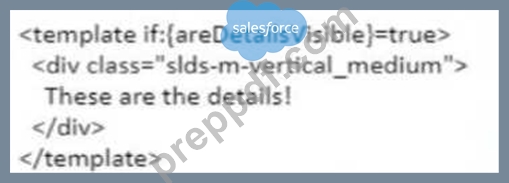
Which template will correctly display the details message only when areDetailsVisible becomes true given the following code in a Lightning Web Component?
- A.

- B.

- C.

- D.
Answer: B
Explanation:
The template that will correctly display the details message only when areDetailsVisible becomes true given the following code in a Lightning Web Component is option C. Option C uses the if:true directive to conditionally render a template block based on the value of areDetailsVisible. If areDetailsVisible is true, the template block inside the <template if:true={areDetailsVisible}> tag will be rendered. Otherwise, it will be skipped. Option A is incorrect because it uses the if:false directive, which does the opposite of if:true. It renders the template block only when areDetailsVisible is false. Option B is incorrect because it uses an invalid syntax for the if directive. The if directive requires a colon (:) after the if keyword, not an equal sign (=). Option D is incorrect because it uses an invalid syntax for the template tag. The template tag requires a closing tag (</template>), not a self-closing tag (<template/>). Salesforce Lightning Web Components Developer Guide: Conditional Rendering,Lightning Web Components Developer Guide: Template Syntax
NEW QUESTION # 63
Which method signature is used in the Global API's?
- A. List<List<Object>>
- B. Changes based on API and Method name
- C. ccrz.cc_Output (ccrz:cc_Input input)
- D. Map<String, Object>
Answer: C
Explanation:
The method signature that is used in the Global API's is ccrz.cc_Output (ccrz.cc_Input input). This signature indicates that the Global API methods take a single input parameter of type ccrz.cc_Input and return an output of type ccrz.cc_Output. These are custom classes that are defined in the cloudcraze managed package and contain various properties and methods for handling the input and output data. For example,ccrz.ccServiceProduct.getProducts(ccrz.cc_Input input)is a Global API method that takes an input object and returns an output object containing product data. Salesforce B2B Commerce and D2C Commerce Developer Guide,API Classes,cc_Input Class,cc_Output Class
NEW QUESTION # 64
What does a developer need to do to modify the out-of-the-box checkout flow template?
- A. Modify directly and save to activate
- B. Clone, modify and rename to Checkout Flow
- C. Create each flow from scratch
- D. Clone, modify, activate and refer in Experience Builder
Answer: D
Explanation:
To modify the out-of-the-box checkout flow template in Salesforce B2B Commerce, a developer should clone the existing template, make the necessary modifications, activate the modified template, and then reference it in the Experience Builder. This approach ensures that the original template remains intact and provides a fallback option. Salesforce documentation on customizing the checkout flow in B2B Commerce emphasizes the importance of using the Experience Builder for such customizations, providing a visual interface to manage and reference different checkout flow templates.
NEW QUESTION # 65
Which HTML element can be used as a root tag for a Lightning Web Component's HTML file?
- A. <article>
- B. <html>
- C. <template>
- D. <body>
Answer: C
Explanation:
In Lightning Web Components (LWC), the root tag for the component's HTML file must be <template>. This tag defines the markup structure for the component and is essential for the LWC framework to correctly render the component in the Salesforce Lightning Experience. The <template> tag is unique to LWC and is not interchangeable with standard HTML tags like <body>, <article>, or <html>. For more information, see the Salesforce LWC documentation: Salesforce LWC HTML Templates Documentation.
NEW QUESTION # 66
Which method needs to be implemented when rendering a Salesforce B2B
Commerce view in order to have it called after rendering has finished?
- A. afterRender()
- B. There are no methods called on the view after rendering has finished
- C. onRender()
- D. postRender()
Answer: D
Explanation:
The method that needs to be implemented when rendering a Salesforce B2B Commerce view in order to have it called after rendering has finished is postRender. This method is an optional hook that can be defined by the user to perform any actions or logic that depend on the view being rendered, such as initializing widgets, binding events, or updating the user interface. The method will be called by the render method of the CCRZ.View class, which is the base class for all views in the framework. Salesforce B2B Commerce and D2C Commerce Developer Guide,View Class
NEW QUESTION # 67
What is a valid way of referencing the CC Cart Object whose API name is E_Cart__c in a SOQL query?
- A. _Cart__c
- B. ccrz__E_Cart__c
- C. c.E_Cart__c
- D. cloudcraze__E_Cart__c
Answer: B
Explanation:
A valid way of referencing the CC Cart Object whose API name is E_Cart__c in a SOQL query is to use ccrz__E_Cart__c. This is the transformed name of the object that is used by the Salesforce B2B Commerce framework. All custom objects and fields that are part of the cloudcraze managed package have the prefix ccrz__ in their API names. For example,SELECT Id, Name FROM ccrz__E_Cart__cwill query the CC Cart Object records. Salesforce B2B Commerce and D2C Commerce Developer Guide,Query Transformation
NEW QUESTION # 68
......
AP-202 PDF Dumps Extremely Quick Way Of Preparation: https://www.preppdf.com/Salesforce/AP-202-prepaway-exam-dumps.html