

NSE6_FSM_AN-7.4 Pre-Exam Practice Tests | (Updated 94 Questions)
Valid NSE6_FSM_AN-7.4 Exam Q&A PDF - One Year Free Update
NEW QUESTION # 53
Refer to the exhibit.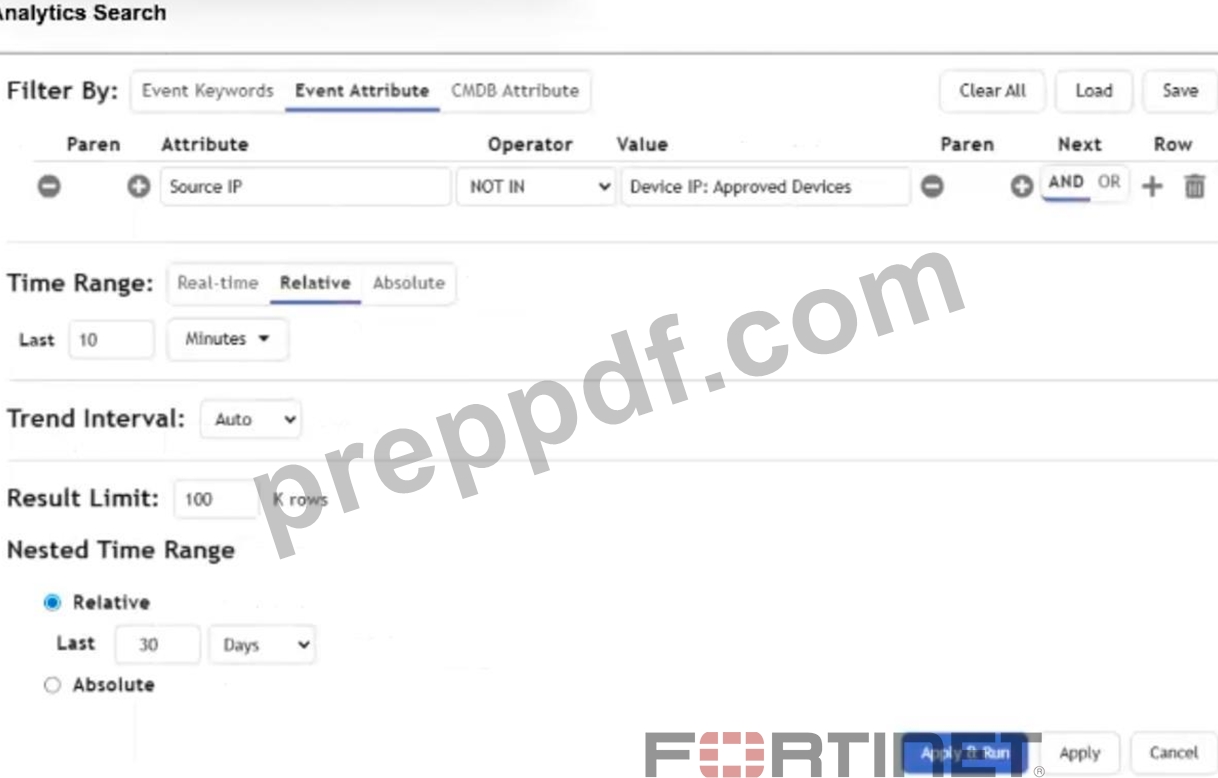
Which statement about the time range settings defined in the nested query is accurate?
- A. FortiSIEM will search the last 30 days of events for a source IP address that is not in the Approved Devices report.
- B. FortiSIEM will search in real time using 10 minute blocks for a source IP address that is not in the Approved Devices report from the last 30 days.
- C. FortiSIEM will list source IP addresses found the last 10 minutes of events from each day in the Approved Devices report from the last 30 days.
- D. FortiSIEM will search the last 10 minutes of events for a source IP address that is not in the Approved Devices report from the last 30 days.
Answer: D
Explanation:
The main analytics search uses the last 10 minutes as the event time range. The nested query uses the Approved Devices report generated from the last 30 days, so FortiSIEM compares recent source IP addresses against that 30-day approved-device result set.
NEW QUESTION # 54
Refer to the exhibit. Why is this search not producing any results?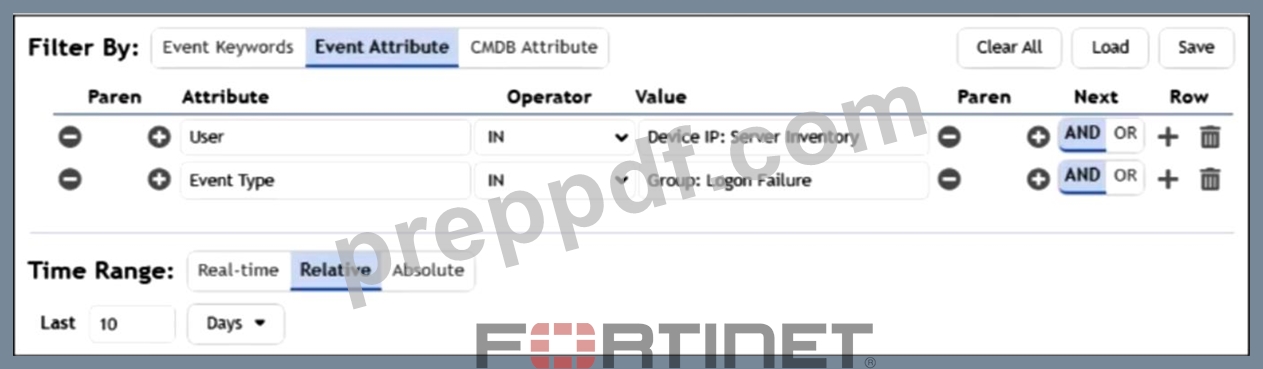
- A. There is a nested query attribute type mismatch.
- B. You cannot reference both the User and Event Type attributes in the same analytics search.
- C. You did not use the configuration management database (CMDB) group search properly.
- D. You must set the Operator to = for both queries.
- E. You must set the Time Range to Real-time to identify login failures.
Answer: A
Explanation:
The query contains a nested query attribute type mismatch because the User attribute is being compared against a Device IP group value. The attribute type and referenced group type must match for the search to return results.
NEW QUESTION # 55
In an automation policy, which two methods can you use to notify analysts when an incident is triggered?
(Choose two.)
- A. Email
- B. FortiSIEM Case
- C. Pop-up window
- D. Syslog
Answer: A,B
Explanation:
The correct answers are A. Email and B. FortiSIEM Case. FortiSIEM automation policies can notify or route work to analysts when an incident is triggered. The Study Guide describes the incident notification email workflow and explains that when an incident triggers and an automation policy is defined, FortiSIEM can send a notification email using the default template. It also explains that notification frequency is configured per rule and that repeated incident notifications are controlled by the frequency timer. The FortiSIEM 7.4 User Guide also describes automated case creation through automation policy. It states that an automation policy can use the action Create Case when an incident is created, and that a case management policy can assign FortiSIEM Analyst Teams in an ordered handling sequence. Syslog is not listed as one of the analyst notification methods in the automation policy options shown in this question; FortiSIEM supports SNMP and webhook-style actions, but not
"Syslog" as the listed answer. A pop-up window is not an automation policy notification method.
Therefore, the two correct analyst-notification/routing methods are Email and FortiSIEM Case.
NEW QUESTION # 56
An analyst wants to create a rule from a new analytic search they just performed. Which method is the most efficient way for you to create the rule?
- A. Manually re-create the analytics search in the rule configuration.
- B. Make a new rule using the Create Rule option in the Actions menu.
- C. Save the search as a template, and create a new rule from the template.
- D. Copy and paste the raw analytics search text into a rule subpattern.
Answer: B
Explanation:
Using the Create Rule option directly from the Actions menu is the most efficient method because it automatically converts the existing analytic search into a rule structure without requiring manual reconfiguration.
NEW QUESTION # 57
When configuring machine learning (ML), in which step can you modify how the model fits the training data set?
- A. Design
- B. Statistics
- C. Train
- D. Prepare Data
Answer: B
NEW QUESTION # 58
Refer to the exhibit. If a user account is locked after five failed login attempts, how many times will this rule be triggered if three individual users all fail their login 10 times?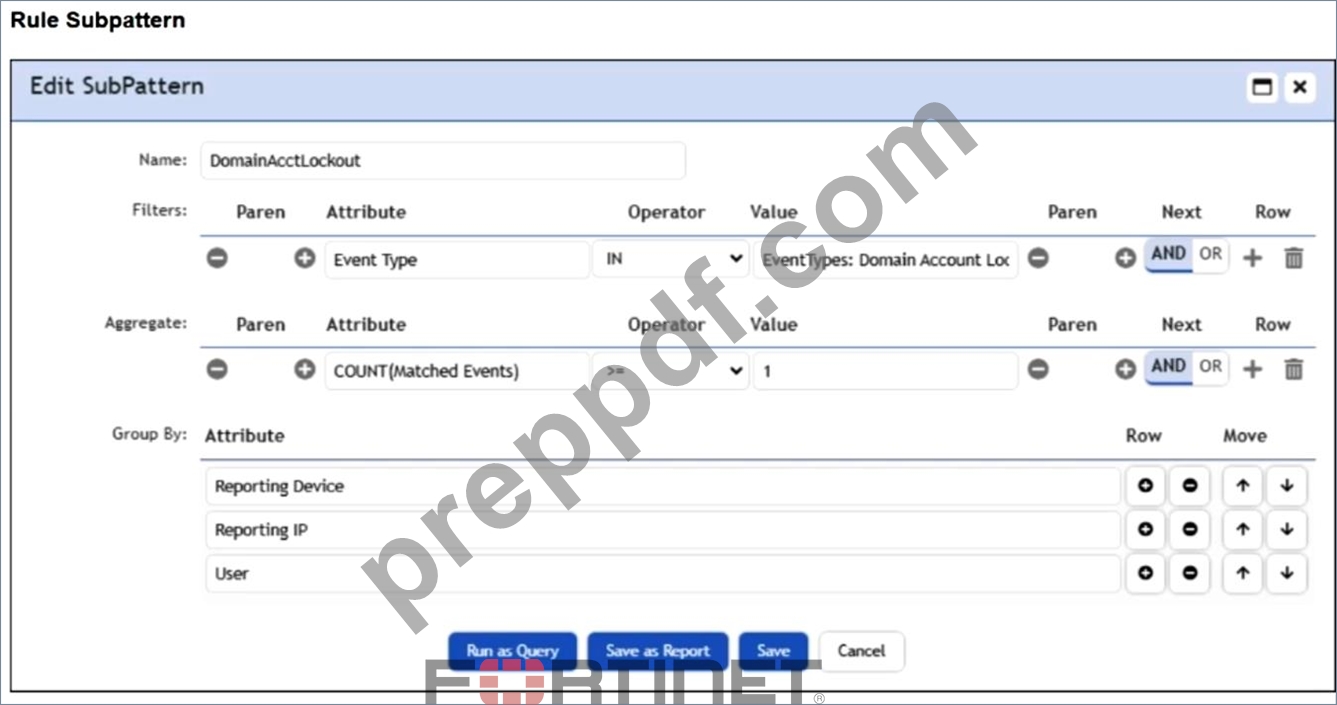
- A. Three
- B. Fifteen
- C. One
- D. Five
Answer: A
Explanation:
The rule groups matching account lockout events by User, along with the reporting device attributes. Each user account produces one account lockout event after the failed-login threshold is reached, so three individual users trigger the rule three times.
NEW QUESTION # 59
A rule that detects network connections to an SSH server is triggering constantly in response to background internet traffic and must be tuned. Which method is used to tune this rule and solve the issue?
- A. Increase the COUNT (Matched Events)value in the subpattern.
- B. Block connections from unauthorized networks before they reach the server.
- C. Update the Group By attribute to include only allowed host IP addresses.
- D. Increase the time window on the FortiSIEM rule.
Answer: A
Explanation:
Increasing the matched-event count threshold tunes the rule so that a single or low-volume background connection does not immediately create an incident. The rule will trigger only when the number of SSH connection events reaches the defined threshold within the rule's evaluation window.
NEW QUESTION # 60
What can you use to send data to FortiSIEM for user and entity behavior analytics (UEBA)?
- A. SSH
- B. FortiSIEM agent
- C. FortiSIEM worker
- D. SNMP
Answer: B
Explanation:
The correct answer is A. FortiSIEM agent. The FortiSIEM Study Guide identifies FortiSIEM agents as the component responsible for "file, log monitoring, and UEBA." It also explains that FortiSIEM agents can be installed on endpoints or servers to provide data collection functions that native syslog may not provide. For Windows systems specifically, the guide states that Windows servers do not natively send syslog messages and that a FortiSIEM Windows agent can be installed to perform that function. The FortiSIEM 7.4 User Guide also confirms that FortiInsight UEBA functionality runs as an integrated module within the FortiSIEM Windows Agent in newer releases. SSH and SNMP are access or monitoring protocols; they can support discovery or performance monitoring, but they are not the UEBA data-sending component. A FortiSIEM worker performs analysis and search functions inside the FortiSIEM architecture; it is not installed on endpoints to collect UEBA telemetry. Therefore, the FortiSIEM agent is the correct mechanism for sending UEBA-relevant endpoint data to FortiSIEM.
NEW QUESTION # 61
Refer to the exhibit.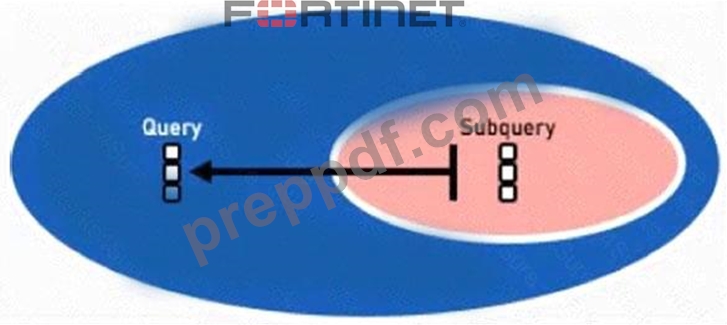
Which two lookup types can you reference as the subquery in a nested analytics query? (Choose two.)
- A. SNMP Query
- B. CMDB Query
- C. LDAP Query
- D. Event Query
Answer: B,D
Explanation:
The FortiSIEM Study Guide defines a nested query as a query that has another query embedded within it, where the embedded query is known as the subquery. The FortiSIEM 7.4 User Guide lists the supported nested search scenarios: Outer CMDB Query, Inner Event Query ; Outer Event Query, Inner Event Query ; and Outer Event Query, Inner CMDB Query . These supported combinations prove that the inner or subquery can be either an Event Query or a CMDB Query. LDAP Query and SNMP Query are not listed as supported nested analytics subquery types. LDAP may be used for user discovery or authentication, and SNMP may be used for monitoring or discovery, but neither is referenced as a nested analytics query type.
The User Guide also explains that the outer query uses Select from Report to reference the saved inner query and that the matching attribute data types must align between the outer query and the selected display column in the inner query.
NEW QUESTION # 62
You need a model for predicting a target field based on other fields in a dataset and then trigger an anomaly if the value does not match the prediction. Which machine learning algorithm will build this type of model?
- A. Regression
- B. Regression
- C. Forecasting
- D. Clustering
Answer: A
Explanation:
A Regression algorithm is used when predicting a continuous or numeric target field based on other features in the dataset. In FortiSIEM, regression-based machine learning models establish expected values, and an anomaly is triggered when the actual observed value significantly deviates from the regression prediction.
NEW QUESTION # 63
Refer to the exhibit.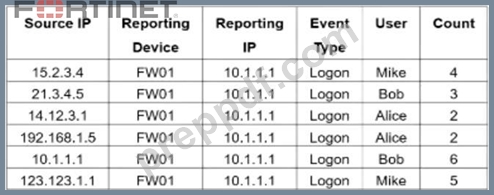
If you group these events by the User and Count attributes, how many unique results will FortiSIEM display?
- A. Five
- B. Four
- C. Six
- D. Three
Answer: A
Explanation:
Grouping by User and Count combines only rows that have the same values for both attributes.
The two Alice rows with a count of 2 are grouped into one result, while the other user-and-count combinations remain unique, so FortiSIEM displays five unique results.
NEW QUESTION # 64
A critical server is sending traffic that is triggering a high severity outbound intrusion prevention system (IPS) permitted IPS exploit rule. This traffic must be allowed. Which two items must you configure to prevent this sever from triggering the incident? (Choose two.)
- A. Change the time window on the rule conditions.
- B. Modify the aggregate count in the subpattern.
- C. Modify the group by parameters to exclude the IP address.
- D. Create a rule exception for the IP address.
- E. Modify the subpattern filter to exclude the IP address.
Answer: D,E
Explanation:
To stop a known allowed server from generating this incident, you can tune the rule logic by excluding the server IP address in the subpattern filter. You can also create a rule exception for that IP address, which suppresses incident generation for matching traffic from the approved server while leaving the rule active for other sources.
NEW QUESTION # 65
Which two data areas can you use for user and entity behavior analytics (UEBA) machine learning models? (Choose two.)
- A. process
- B. resources
- C. location
- D. network
Answer: C,D
Explanation:
FortiSIEM's UEBA models analyze user and entity behavior by correlating data such as location (for detecting unusual logins or access patterns) and network activity (for identifying abnormal communication or traffic behaviors). These data areas enable the system to build baseline profiles and detect anomalies indicating potential insider threats or compromised accounts.
NEW QUESTION # 66
You want to create a rule with multiple subpatterns but trigger an incident only if three different subpatterns are matched over a 24-hour period. Where must you define the time period that the rule uses to evaluate all the subpatterns?
- A. Define the time window under the General tab of the rule
- B. Define the time window in each individual subpattern.
- C. Define the time window under the Define Condition tab of the rule
- D. Define the time window in the Define Action section of the rule.
Answer: A
Explanation:
For a rule that evaluates multiple subpatterns together, the shared evaluation period is configured as the rule's time window under the General tab. This defines the overall period FortiSIEM uses to correlate the required subpattern matches before triggering the incident.
NEW QUESTION # 67
Refer to the exhibit.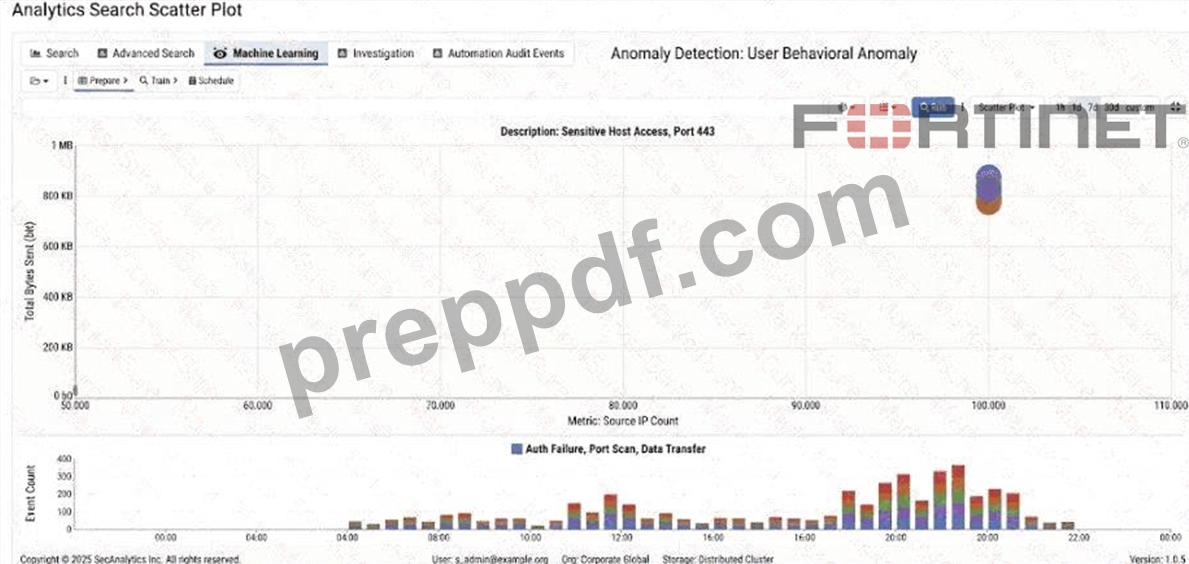
An analyst wants to perform a KMeans machine learning (ML) job on this data. How many N clusters would be a good fit for the data? (Choose one answer)
- A. Two
- B. One
- C. 0
- D. 1
Answer: A
Explanation:
The best answer is A. Two . The exhibit shows an Analytics Search scatter plot with two visually distinct groups of data points: one isolated group around the lower-left area of the chart and another dense group near the upper-right area. For KMeans clustering, the analyst must provide the number of clusters based on the observed structure of the data. The FortiSIEM 7.4 User Guide describes KMeans as "an unsupervised clustering algorithm that groups data points into user specified K groups so that each data point belongs to one group." It also states that KMeans "tries to iteratively minimize intra-cluster distance and maximize inter- cluster distance" and notes that the user must "specify the number of clusters based on user's knowledge of data." The same FortiSIEM guide explains that during Clustering Local Mode training, the analyst chooses the algorithm and, "for KMeans choose the cluster size as a guess." In this exhibit, the natural guess is
2, because the scatter plot separates into two obvious groups. Fifty or 100 clusters would overfit the small number of visible groups, while one cluster would merge two clearly separate behaviors into a single cluster.
NEW QUESTION # 68
What are four incident status options on FortiSIEM?
- A. Active, auto closed, closed manually, system closed
- B. Active, auto cleared, cleared manually, system cleared
- C. Active, closed, cleared, resolved
- D. Active, cleared, false negative, false positive
Answer: C
Explanation:
FortiSIEM incidents can use status values that track the incident lifecycle, including active investigation, closure, clearing, and resolution. These statuses help analysts manage whether an incident is still open, has been cleared by conditions, has been closed, or has been resolved.
NEW QUESTION # 69
Which three types of data can you use to train FortiSIEM machine learning (ML)? (Choose three.)
- A. FortiSIEM analytical reports
- B. CSV files
- C. FortiSIEM ML job
- D. Configuration management database (CMDB)
- E. SQL database
Answer: A,B,E
Explanation:
FortiSIEM machine learning models can be trained using structured data from CSV files, FortiSIEM analytical reports, and SQL database sources. These sources provide the historical datasets needed to prepare, train, and evaluate the ML model.
NEW QUESTION # 70
When FortiSIEM is configured to apply ZTNA tags, what is the order of events when an analyst wants to automatically block a ZTNA tagged host?
- A. FortiSIEM tags host > FortiEMS receives tag information > FortiEMS tags host > ZTNA tags enforced on FortiGate
- B. FortiEMS receives tag information > FortiEMS tags host > FortiSIEM tags host > ZTNA tags enforced on FortiGate
- C. FortiEMS tags host > FortiSIEM receives tag information > FortiSIEM tags host > ZTNA tags enforced on FortiGate
- D. FortiEMS tags host > FortiEMS receives tag information > FortiSIEM tags host > ZTNA tags enforced on FortiGate
Answer: C
Explanation:
The correct sequence for ZTNA tag enforcement is:
1. FortiEMS tags the host based on endpoint posture or detected condition.
2. FortiSIEM receives the tag information from FortiEMS.
3. FortiSIEM applies its own tag (for example, "blocked") to the host based on automation or incident rules.
4. FortiGate enforces the ZTNA tag policy, blocking or restricting access according to configured rules.
Thus, the event flow is FortiEMS tags host → FortiSIEM receives tag info → FortiSIEM tags host
→ FortiGate enforces tags.
NEW QUESTION # 71
Which two elements can you use to define how an automation policy activates? (Choose two.)
- A. Time range
- B. Lookup table
- C. Rules
- D. Watchlist
Answer: A,C
NEW QUESTION # 72
Which two ways are rule tags used on FortiSIEM? (Choose two.)
- A. Playbook filtering
- B. Event searches
- C. Zero trust network access (ZTNA) enforcement on FortiClient EMS
- D. Administrative user permissions
Answer: A,B
Explanation:
Rule tags help classify and organize rules so analysts can search events or incidents associated with tagged rules. They can also be used to filter playbooks, making it easier to associate the appropriate playbook workflows with specific categories of rule-triggered incidents.
NEW QUESTION # 73
Refer to the exhibits.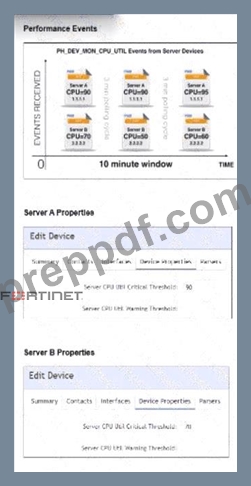
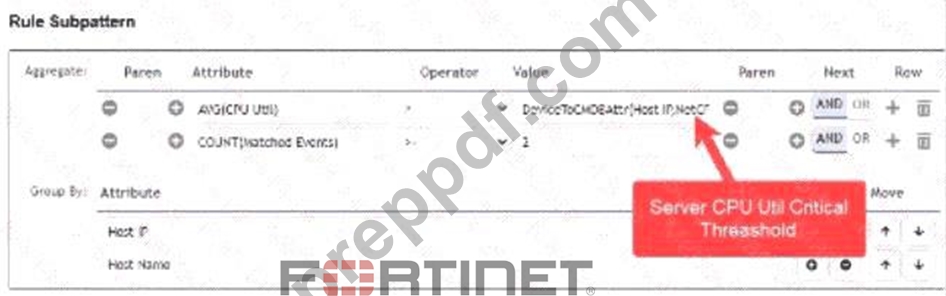
Three events are collected over 10 minutes from two servers: Server A and Server B.
Based on the settings for the rule subpattern and a 10-minute condition window, how many incidents will the servers generate?
- A. Server A will generate one incident and Server B will generate one incident.
- B. Server A will generate one incident and Server B will not generate any incidents.
- C. Server A will not generate any incidents and Server B will not generate any incidents.
- D. Server A will not generate any incidents and server B will generate one incident.
Answer: B
Explanation:
The correct answer is D because Server A satisfies the rule's threshold and count requirements, while Server B does not. The Study Guide explains that a FortiSIEM subpattern consists of Filter , Aggregate , and Group By components. It also states that the Aggregate function defines how many or what metric values must match during the time window, while Group By controls how the matching events are grouped into rows. The performance metrics lesson explains that FortiSIEM collects performance and availability data, converts polling results into logs, and uses those metrics for performance, availability, resource utilization, and baselining. In the exhibit, the aggregate evaluates CPU utilization against the device's CPU critical threshold and also requires a matched-event count of at least two within the 10-minute window. Server A has CPU values above its critical threshold enough times in the window, so it generates one incident. Server B has a lower configured threshold but its collected CPU values do not satisfy the required aggregate condition for the grouped server. Therefore, only Server A generates an incident.
NEW QUESTION # 74
Refer to the exhibit.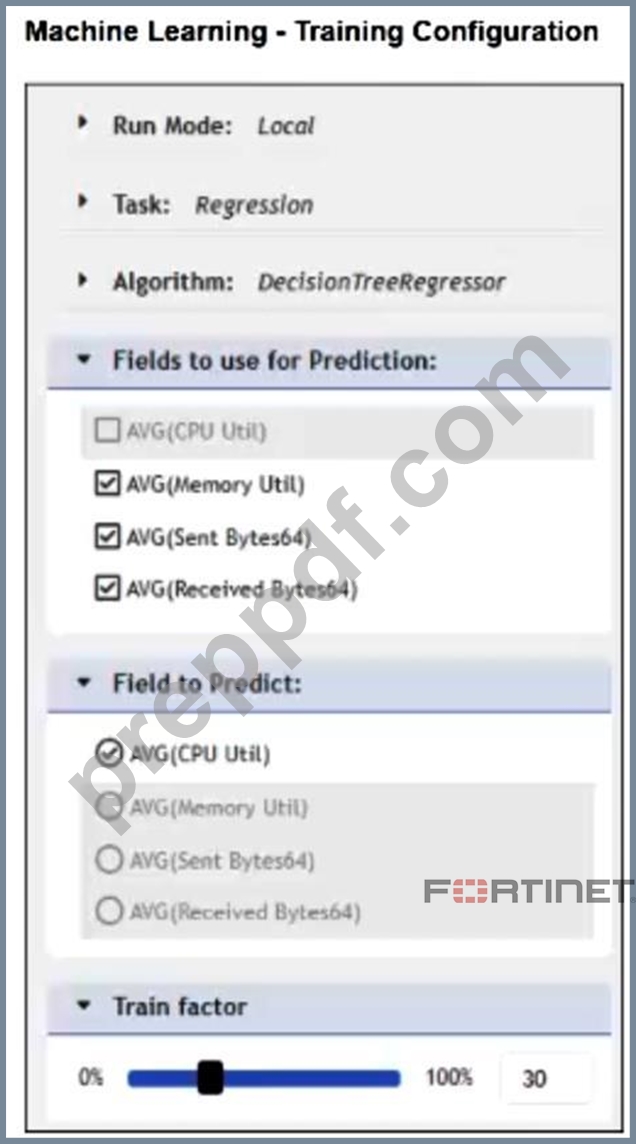
An incorrect configuration is shown.
Which setting must you change to successfully apply this configuration to FortiSIEM?
- A. Select the same values in the Fields to use for Prediction and Field to Predict sections.
- B. Set the Run Mode to ML.
- C. Set the Train factor to 70% or greater.
- D. Set the algorithm to Anomaly Detection.
Answer: C
Explanation:
For a regression machine learning job, the train factor must allocate enough data for model training. Setting it to 70% or greater provides sufficient training data so FortiSIEM can successfully apply and train the model configuration.
NEW QUESTION # 75
How can you query the configuration management database (CMDB) in an analytics search?
- A. On the Admin tab, click CMDB Search.
- B. Click Attribute > Select from CMDB.
- C. Click Value > Select from CMDB.
- D. On the CMDB tab, select an entry, and then click Create Search.
Answer: C
Explanation:
The correct answer is A because CMDB objects are referenced from the Value field after selecting the appropriate event attribute and operator. The FortiSIEM Study Guide gives a structured search example that references the CMDB. In that example, the attribute is Reporting IP, the operator is IN, and the value is selected from CMDB groups such as Devices: Windows and Networks: Inside Net. The guide explains that to show events reported by Windows servers within a specific network, you set the attribute and operator first, then browse the CMDB and select the relevant CMDB group value. This confirms the workflow: the CMDB reference is chosen as the value of the condition, not as the attribute itself. Option B is incorrect because the CMDB tab is not used to launch the analytics search this way.
Option C is not a valid workflow. Option D is wrong because the attribute is selected from event or CMDB attribute lists, while the CMDB object or group is selected in the value field.
NEW QUESTION # 76
Which two types of information can FortiSIEM retrieve from FortiClient EMS through an external connection? (Choose two.)
- A. Zero trust network access (ZTNA) tags
- B. Vulnerability scan events
- C. Device login credentials
- D. Devices with FortiSIEM agents
Answer: A,B
Explanation:
FortiSIEM can integrate with FortiClient EMS to retrieve vulnerability scan events and ZTNA tag information. These integrations enhance endpoint visibility and support automated security and access-control workflows.
NEW QUESTION # 77
How can an administrator restrict the application of an automation policy on FortiSIEM? (Choose two.)
- A. Apply the automation policy to a specific Incident and Incident Groups
- B. Apply the automation policy to specific Event Types
- C. Apply the automation policy to specific Organizations
- D. Apply the automation policy to specific Rules and Rule Groups
Answer: C,D
Explanation:
FortiSIEM automation policies can be restricted by associating them with specific Rules or Rule Groups and by limiting them to specific Organizations, allowing targeted automation execution within selected environments.
NEW QUESTION # 78
......
Fortinet NSE 6 - FortiSIEM 7.4 Analyst Free Update Certification Sample Questions: https://www.preppdf.com/Fortinet/NSE6_FSM_AN-7.4-prepaway-exam-dumps.html