

Updated Sep-2021 Test Engine or PDF for the Microsoft AZ-400 test to help you quickly prepare for the Microsoft exam!
Full AZ-400 Practice Test and 329 unique questions with explanations waiting just for you, get it now!
NEW QUESTION 64
Your company has an Azure subscription.
The company requires that all resource group in the subscription have a tag named organization set to a value of Contoso.
You need to implement a policy to meet the tagging requirement.
How should you complete the policy? To answer, select the appropriate options in the answer area.
NOTE: Each correct selection is worth one point.
Answer:
Explanation:
Explanation:
Box 1: " Microsoft.Resources/subscriptions/resourceGroups"
Box 2: "Deny",
Sample - Enforce tag and its value on resource groups
},
"policyRule": {
"if": {
"allOf": [
{
"field": "type",
"equals": "Microsoft.Resources/subscriptions/resourceGroups"
},
{
"not": {
"field": "[concat('tags[',parameters('tagName'), ']')]",
"equals": "[parameters('tagValue')]"
}
}
]
},
"then": {
"effect": "deny"
}
}
}
}
References:
https://docs.microsoft.com/en-us/azure/governance/policy/samples/enforce-tag-on-resource-groups
NEW QUESTION 65
You need to create and configure an Azure Storage account named az400lod11566895stor in a resource group named RG1lod11566895 to store the boot diagnostics for a virtual machine named VM1.
To complete this task, sign in to the Microsoft Azure portal.
- A. Step 1: To create a general-purpose v2 storage account in the Azure portal, follow these steps:
* On the Azure portal menu, select All services. In the list of resources, type Storage Accounts. As you begin typing, the list filters based on your input. Select Storage Accounts.
* On the Storage Accounts window that appears, choose Add.
* Select the subscription in which to create the storage account.
* Under the Resource group field, select RG1lod11588895
* Next, enter a name for your storage account named: az400lod11566895stor
* Select Create.
Step 2: Enable boot diagnostics on existing virtual machine
To enable Boot diagnostics on an existing virtual machine, follow these steps:
1. Sign in to the Azure portal, and then select the virtual machine VM1.
2. In the Support + troubleshooting section, select Boot diagnostics, then select the Settings tab.
3. In Boot diagnostics settings, change the status to On, and from the Storage account drop-down list, select the storage account az400lod11588895stor.
4. Save the change.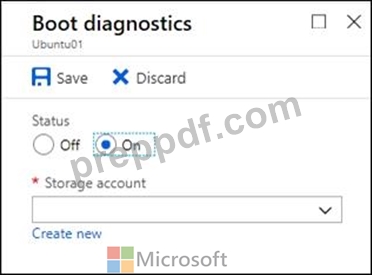
You must restart the virtual machine for the change to take effect. - B. Step 1: To create a general-purpose v2 storage account in the Azure portal, follow these steps:
* On the Azure portal menu, select All services. In the list of resources, type Storage Accounts. As you begin typing, the list filters based on your input. Select Storage Accounts.
* On the Storage Accounts window that appears, choose Add.
* Select the subscription in which to create the storage account.
* Under the Resource group field, select RG1lod11566895
* Next, enter a name for your storage account named: az400lod11566895stor
* Select Create.
Step 2: Enable boot diagnostics on existing virtual machine
To enable Boot diagnostics on an existing virtual machine, follow these steps:
1. Sign in to the Azure portal, and then select the virtual machine VM1.
2. In the Support + troubleshooting section, select Boot diagnostics, then select the Settings tab.
3. In Boot diagnostics settings, change the status to On, and from the Storage account drop-down list, select the storage account az400lod11566895stor.
4. Save the change.
You must restart the virtual machine for the change to take effect.
Answer: B
Explanation:
Reference:
https://docs.microsoft.com/en-us/azure/storage/common/storage-account-create
https://docs.microsoft.com/en-us/azure/virtual-machines/troubleshooting/boot-diagnostics
NEW QUESTION 66
You have an Azure Kubermets Service (AKS) implementation that is RBAC-enabled You plan to use Azure Container Instances as a hosted development environment to run containers in the AKS implementation.
You need to conjure Azure Container Instances as a hosted environment for running me containers in AKS.
Which three actions should you perform m sequence?
To answer, move the appropriate actions from the list of actions to the answer area and arrange them in the correct order.
Answer:
Explanation:
Explanation
Step 1: Create a YAML file.
If your AKS cluster is RBAC-enabled, you must create a service account and role binding for use with Tiller.
To create a service account and role binding, create a file named rbac-virtual-kubelet.yaml Step 2: Run kubectl apply.
Apply the service account and binding with kubectl apply and specify your rbac-virtual-kubelet.yaml file.
Step 3: Run helm init.
Configure Helm to use the tiller service account:
helm init --service-account tiller
You can now continue to installing the Virtual Kubelet into your AKS cluster.
References: https://docs.microsoft.com/en-us/azure/aks/virtual-kubelet
NEW QUESTION 67
You need to recommend project metrics for dashboards in Azure DevOps.
Which chart widgets should you recommend for each metric? To answer, drag the appropriate chart widgets to the correct metrics. Each chart widget may be used once, more than once, or not at all. You may need to drag the split bar between panes or scroll to view content.
NOTE: Each correct selection is worth one point.
Answer:
Explanation:
Explanation
Box 1: Lead time
Lead time measures the total time elapsed from the creation of work items to their completion.
Box 2: Cycle time
Cycle time measures the time it takes for your team to complete work items once they begin actively working on them.
Box 3: Burndown
Burndown charts focus on remaining work within a specific time period.
NEW QUESTION 68
You are configuring an Azure DevOps deployment pipeline. The deployed application will authenticate to a web service by using a secret stored in an Azure key vault.
You need to use the secret in the deployment pipeline.
Which three actions should you perform in sequence? To answer, move the appropriate actions from the list of actions to the answer area and arrange them in the correct order.
Answer:
Explanation:
Explanation
Creating a service principal
Creating a key vault
Check the Azure Pipeline
NEW QUESTION 69
You are building an application that has the following assets:
* Source code
* Logs from automated tests and builds
* Large and frequently updated binary assets
* A common library used by multiple applications
Where should you store each asset? To answer, drag the appropriate Azure services to the correct assets. Each service may be used once. You may need to drag the split bar between panes or scroll to view content.
NOTE: Each correct selection is worth one point.
Answer:
Explanation:
Explanation
Box 1: Azure Repos
Box 2: Azure Artifacts
Use Azure Artifacts to create, host, and share packages with your team.
Box 3: Azure Pipelines
In the pipeline view you can see all the stages and associated tests. The view provides a summary of the test results Box 4: Azure Storage Reference:
https://docs.microsoft.com/en-us/azure/devops/repos/get-started/what-is-repos
https://azure.microsoft.com/en-us/services/devops/artifacts/
https://docs.microsoft.com/en-us/azure/devops/pipelines/test/review-continuous-test-results-after-build
NEW QUESTION 70
You are deploying a new application that uses Azure virtual machines.
You plan to use the Desired State Configuration (DSC) extension on the virtual machines.
You need to ensure that the virtual machines always have the same Windows features installed.
Which three actions should you perform in sequence? To answer, move the appropriate actions from the list of actions to the answer area and arrange them in the correct order.
Answer:
Explanation:
Explanation
Step 1: Create a PowerShell configuration file
You create a simple PowerShell DSC configuration file.
Step 2: Load the file to Azure Blob storage
Package and publish the module to a publically accessible blob container URL Step 3: Configure the Custom Script Extension on the virtual machines.
The Custom Script Extension downloads and executes scripts on Azure virtual machines.
Reference:
https://docs.microsoft.com/en-us/azure/automation/automation-dsc-getting-started
https://docs.microsoft.com/en-us/azure/virtual-machines/extensions/custom-script-windows
NEW QUESTION 71
You are planning projects for three customers. Each customer's preferred process for work items is shown in the following table.
The customers all plan to use Azure DevOps for work item management.
Which work item process should you use for each customer? To answer, drag the appropriate work item process to the correct customers. Each work item process may be used once, more than once, or not at all. You may need to drag the split bar between panes or scroll to view content.
NOTE: Each correct selection is worth one point.
Answer:
Explanation:
Explanation
Box 1: Scrum
Choose Scrum when your team practices Scrum. This process works great if you want to track product backlog items (PBIs) and bugs on the Kanban board, or break PBIs and bugs down into tasks on the taskboard.
Box 2: Agile
Choose Agile when your team uses Agile planning methods, including Scrum, and tracks development and test activities separately. This process works great if you want to track user stories and (optionally) bugs on the Kanban board, or track bugs and tasks on the taskboard.
Box 3: CMMI
Choose CMMI when your team follows more formal project methods that require a framework for process improvement and an auditable record of decisions. With this process, you can track requirements, change requests, risks, and reviews.
NEW QUESTION 72
Your company plans to deploy an application to the following endpoints:
* Ten virtual machines hosted in Azure
* Ten virtual machines hosted in an on-premises data center environment All the virtual machines have the Azure Pipelines agent.
You need to implement a release strategy for deploying the application to the endpoints.
What should you recommend using to deploy the application to the endpoints? To answer, drag the appropriate components to the correct endpoints. Each component may be used once, more than once, or not at all. You may need to drag the split bar between panes or scroll to view content.
NOTE: Each correct selection is worth one point.
Answer:
Explanation:
Explanation
Box 1: A deployment group
When authoring an Azure Pipelines or TFS Release pipeline, you can specify the deployment targets for a job using a deployment group.
If the target machines are Azure VMs, you can quickly and easily prepare them by installing the Azure Pipelines Agent Azure VM extension on each of the VMs, or by using the Azure Resource Group Deployment task in your release pipeline to create a deployment group dynamically.
Box 2: A deployment group
References: https://docs.microsoft.com/en-us/azure/devops/pipelines/release/deployment-groups
NEW QUESTION 73
You are implementing a package management solution for a Node.js application by using Azure Artifacts.
You need to configure the development environment to connect to the package repository. The solution must minimize the likelihood that credentials will be leaked.
Which file should you use to configure each connection? To answer, drag the appropriate files to the correct connections. Each file may be used once, more than once, or not at all. You may need to drag the split bar between panes or scroll to view content NOTE: Each correct selection is worth one point.
Answer:
Explanation:
References:
https://docs.microsoft.com/en-us/azure/devops/artifacts/npm/npmrc?view=azure-devops&tabs=windows
NEW QUESTION 74
You use Azure Artifacts to host NuGet packages that you create.
You need to make one of the packages available to anonymous users outside your organization. The solution must minimize the number of publication points.
What should you do?
- A. Create a new feed for the package
- B. Publish the package to a public NuGet repository.
- C. Change the feed URL of the package
- D. Promote the package to a release view.
Answer: A
Explanation:
Explanation/Reference:
Explanation:
Azure Artifacts introduces the concept of multiple feeds that you can use to organize and control access to your packages.
Packages you host in Azure Artifacts are stored in a feed. Setting permissions on the feed allows you to share your packages with as many or as few people as your scenario requires.
Feeds have four levels of access: Owners, Contributors, Collaborators, and Readers.
References: https://docs.microsoft.com/en-us/azure/devops/artifacts/feeds/feed-permissions?
view=vsts&tabs=new-nav
NEW QUESTION 75
Note: This question is part of a series of questions that present the same scenario. Each question in the series contains a unique solution that might meet the stated goals. Some question sets might have more than one correct solution, while others might not have a correct solution.
After you answer a question in this section, you will NOT be able to return to it. As a result, these questions will not appear in the review screen.
Your company has a prefect in Azure DevOps for a new web application.
You need to ensure that when code is checked in, a build runs automatically.
Solution: from the Triggers tab of the build pipeline, you select Enable continuous integration Does the meet the goal?
- A. No
- B. Yes
Answer: A
NEW QUESTION 76
How should you configure the release retention policy for the investment planning applications suite? To answer, select the appropriate options in the answer area.
NOTE: Each correct selection is worth one point.
Answer:
Explanation:
Explanation
Scenario: By default, all releases must remain available for 30 days, except for production releases, which must be kept for 60 days.
Box 1: Set the default retention policy to 30 days
The Global default retention policy sets the default retention values for all the build pipelines. Authors of build pipelines can override these values.
Box 2: Set the stage retention policy to 60 days
You may want to retain more releases that have been deployed to specific stages.
References: https://docs.microsoft.com/en-us/azure/devops/pipelines/policies/retention
NEW QUESTION 77
You need to implement Project6.
Which three actions should you perform in sequence? To answer, move the appropriate actions from the list of actions to the answer area and arrange them m the correct order.
Answer:
Explanation:
Explanation
Scenario: Implement Project3, Project5, Project6, and Project7 based on the planned changes
Step 1: Open the release pipeline editor.
In the Releases tab of Azure Pipelines, select your release pipeline and choose Edit to open the pipeline editor.
Step 2: Enable Gates.
Choose the pre-deployment conditions icon for the Production stage to open the conditions panel. Enable gates by using the switch control in the Gates section.
Step 3: Add Query Work items.
Choose + Add and select the Query Work Items gate.
Configure the gate by selecting an existing work item query.
Note: A case for release gate is:
Incident and issues management. Ensure the required status for work items, incidents, and issues. For example, ensure deployment occurs only if no priority zero bugs exist, and validation that there are no active incidents takes place after deployment.
References:
https://docs.microsoft.com/en-us/azure/devops/pipelines/release/deploy-using-approvals?view=azure-devops#co
NEW QUESTION 78
You have a containerized solution that runs in Azure Container Instances. The solution contains a frontend container named App1 and a backend container named DB1. DB1 loads a large amount of data during startup.
You need to verify that DB1 can handle incoming requests before users can submit requests to Appl.
What should you configure?
- A. a performance log
- B. a readiness probe
- C. an Azure Load Balancer health probe
- D. a Iiveness probe
Answer: B
NEW QUESTION 79
......
Get Latest AZ-400 Dumps Exam Questions: https://drive.google.com/open?id=1fDvJDAEAuIuBv36v4fG7YiBPmGVQRMvd
Full AZ-400 Practice Test and 329 unique questions with explanations waiting just for you, get it now: https://www.preppdf.com/Microsoft/AZ-400-prepaway-exam-dumps.html